 Helix
HelixMeet the 5 specialists inside Helix
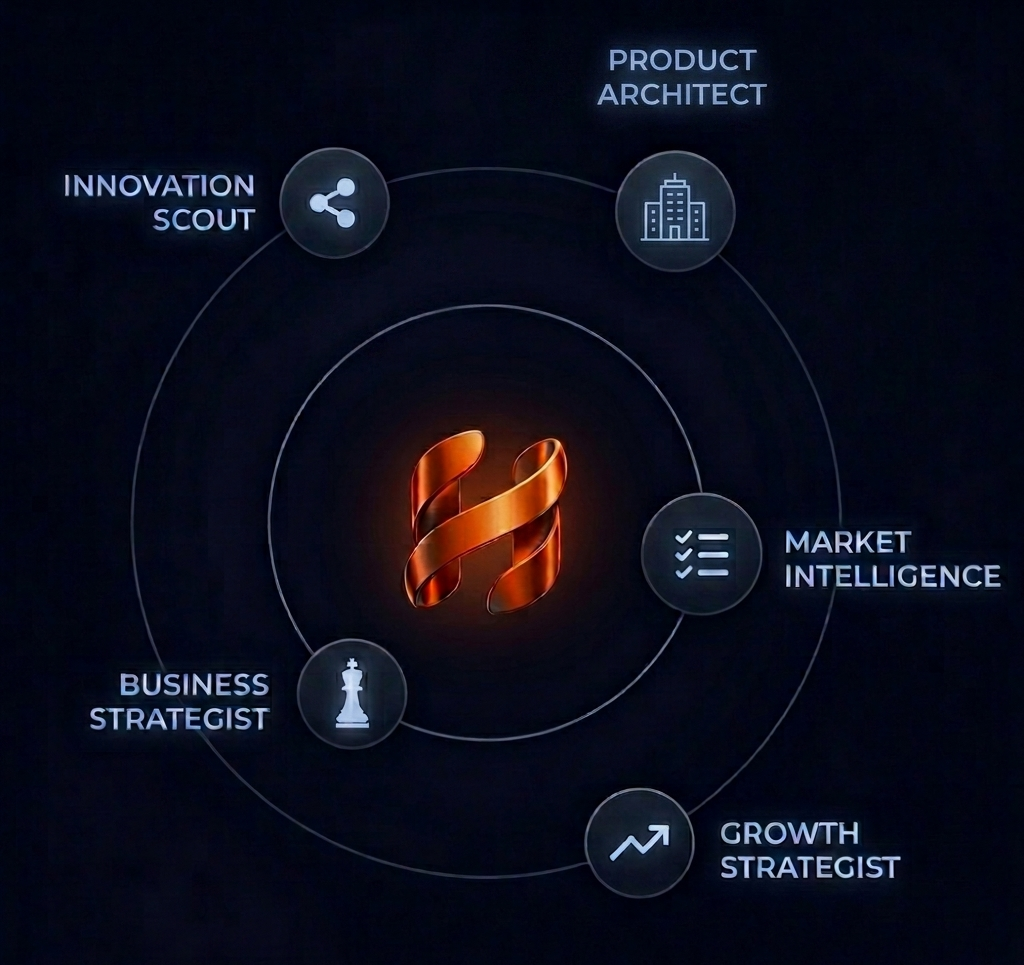
How Helix's specialist agents get pulled into your conversation
Most AI tools give you one model and one chat window. You ask it about your market, it gives you market answers. You ask it about your business model, it switches gears and tries again with the same brain.
Helix doesn't work that way.
Inside Helix, you talk to an orchestrator. That's the main agent that handles your conversation, reads your canvas, and routes work. Behind the orchestrator are five Specialist Agents, each focused on a single dimension of product development. The orchestrator can pull a specialist into the conversation when it decides their expertise is needed. You can also pull one in yourself.
This is how that works.
The five specialists
Each Specialist Agent owns one dimension of your blueprint:
| Specialist | Dimension | What they do |
|---|---|---|
| Innovation Scout | Idea Inception | Helps you find the real customer problem and validate the idea behind your idea |
| Market Intelligence | Market Research | Sizes the market, maps the competitive landscape, segments your customers |
| Product Architect | Product Definition | Drafts PRDs, user stories, and feature priorities |
| Business Strategist | Business Model | Designs pricing, revenue models, and unit economics |
| Growth Strategist | Scaling | Defines metrics, growth experiments, and go-to-market motions |
You don't need to memorize them. The point is that each one has a narrow job and does it well, instead of one generalist that does all five jobs poorly.
How specialists get invoked
There's no separate workspace per specialist. You work on your canvas, you talk to the orchestrator, and specialists get pulled in when they're useful. Two ways that happens.
1. The orchestrator decides
This is the default. As you chat with Helix, the orchestrator reads your message, looks at your canvas, and decides whether the right answer needs a specialist's perspective.
If you ask "are there competitors already doing this?", the orchestrator may decide to consult Market Intelligence. It knows that's the specialist who answers competitive-landscape questions well. If you ask "should I price this monthly or per-seat?", it may consult the Business Strategist.
You'll see a card appear in your chat with the label "Consulting Market Research…" and a live-streaming response inside. When the specialist is done, the orchestrator weaves their answer back into the conversation.
You don't have to do anything to trigger this. The orchestrator is doing the routing.
2. You pick a specialist with /
When you want to bypass the orchestrator's judgment and go straight to a specific specialist, type / in the chat input. A popover appears labeled Specialist Agents with all five options. Pick one (say, Market Intelligence) and the rest of your message is routed through that specialist.
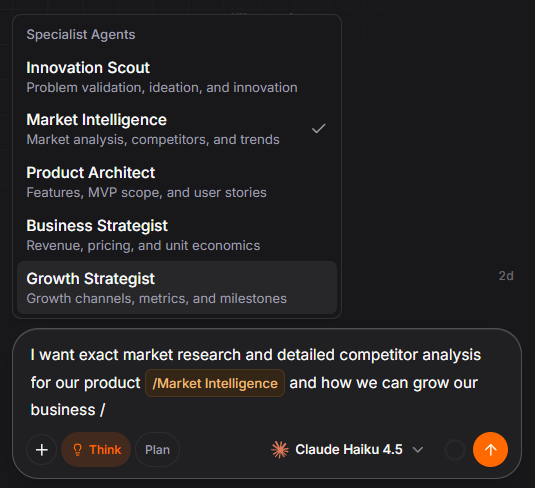
/ to open the Specialist Agents popover. Pick a specialist; the rest of your message routes through them.Useful when:
- You want a specific perspective and don't want to leave it to the orchestrator's discretion
- You want a deep, focused take from one dimension before moving on
- The orchestrator didn't consult anyone and you think it should have
A simple rule: trust the orchestrator's routing most of the time. Use the / picker when you have a clear reason to override it.
What specialists actually produce
Specialists return analysis. They don't directly write to your canvas. That's an important detail.
Their output flows back through the orchestrator. The orchestrator reads what the specialist said, then decides what to do with it: write a response in chat, propose new nodes for your canvas, suggest connections, flag gaps in your blueprint.
Canvas changes always come as proposals: the AI suggests, you accept or reject. You keep the final call on what your blueprint looks like.
What it looks like in the UI
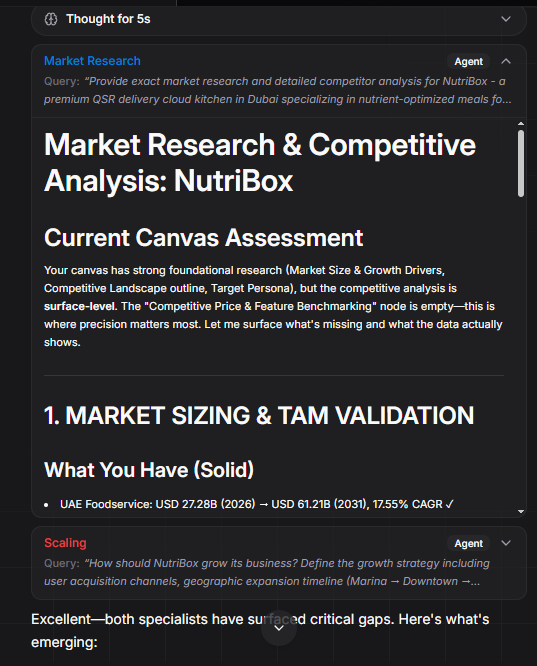
When a specialist gets pulled in, a collapsible card appears in your chat. It shows which specialist was consulted, the question they were asked, and their analysis as it streams in. More than one specialist can be consulted in a single turn. The cards stay in your conversation, expandable any time you want to re-read.
The orchestrator then weaves the findings into its reply, with proposed canvas nodes if any are warranted.
A typical flow
Here's the rhythm of working with the orchestrator + specialists.
You bring an idea. As you describe it, the orchestrator decides which specialists matter for the question on the table and pulls them in. You see them consulted, read their analysis as it streams, and the orchestrator weaves their findings into its reply along with proposed nodes for your canvas.
When you have a question that needs a specific lens (pricing, market sizing, a feature debate), you can skip the routing and call the right specialist yourself. Type /, pick from the popover, and that specialist takes the question directly.
Each pass deepens the blueprint. The canvas grows. The picture sharpens.
The bigger idea
Founders rarely fail because they didn't think about market, business model, product, and growth. They fail because they thought about all four superficially and built on the weakest one.
The specialists exist to prevent that. Each one is paid (so to speak) to be picky about its dimension. Market Intelligence will not let you handwave the competitive landscape. The Business Strategist will not let "we'll figure out pricing later" stand. The Product Architect will push you to commit to user stories before you start building.
That's the moat. It's not one AI trying to be everything. It's a coordinator that knows when to bring in the right expert, and a / shortcut for when you want to skip the coordinator and go straight to the source.
Open Helix, ask the question that's actually on your mind, and watch which specialist gets pulled in.